
Need Help?Contact Us
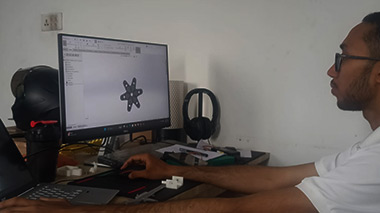
As Nepal's leading 3D printing service provider, Axis Tech has established itself as the go-to destination for businesses, educational institutions, and individual enthusiasts looking to harness the power of additive manufacturing. Our commitment goes beyond just providing equipment – we're dedicated to building a comprehensive ecosystem that supports the entire 3D printing journey.
Complete 3D Printer Supply Chain
Professional Installation & Setup
Comprehensive Training Programs
Professional 3D Design Classes
Duration: 5 Days
Day 1-2: 3D Printing Fundamentals
Day 3-4: Hands-On Printer Operation
Day 5: Project Implementation
Duration: 10 Days
Week 1: Technical Mastery
Week 2: Design Integration
Includes:
Duration: 15 Days
Phase 1: SolidWorks Fundamentals (5 Days)
Phase 2: Advanced Design Techniques (5 Days)
Phase 3: 3D Printing Integration (5 Days)
Certification Benefits:
Healthcare & Medical Applications
Architecture & Construction
Education & Research
Manufacturing & Engineering
Our training programs are led by industry professionals with extensive experience in 3D printing and design. Our certified SolidWorks trainers bring real-world expertise from various industries, ensuring you receive practical knowledge that directly applies to your projects.
Key Trainer Qualifications:
Engineering Graduate Success: "The comprehensive training at Axis Tech transformed my career prospects. Within three months of completing the Expert Package, I secured a position as a design engineer with a leading manufacturing company." - Rajesh Shrestha, Mechanical Engineer
Startup Innovation: "The knowledge gained from Axis Tech's training program enabled our startup to reduce prototyping costs by 60% and accelerate our product development timeline." - Priya Maharjan, Tech Entrepreneur
Our training packages are designed to provide exceptional value through:
Flexible Payment Options:
Comprehensive Support:
Step 1: Consultation Schedule a free consultation to discuss your specific requirements and career goals.
Step 2: Package Selection Choose the training package that best aligns with your objectives and timeline.
Step 3: Enrollment Complete the enrollment process and secure your training slot.
Step 4: Begin Your Journey Start your transformation into a 3D printing professional with expert guidance.
Axis Tech - Print3D Nepal
Address: Lazimpat-02, Kathmandu, Nepal
Phone: +977-9808877932
Email: [email protected]
Website: www.print3dnepal.com
Training Inquiries: Email: [email protected]
The future of manufacturing is here, and Nepal is ready to embrace it. Whether you're an individual looking to enhance your skills, a business seeking to innovate, or an educational institution preparing students for tomorrow's challenges, Axis Tech has the expertise and resources to guide your journey.
Don't let this opportunity pass by. Contact us today to schedule your free consultation and discover how our comprehensive training programs can transform your approach to design and manufacturing.
Ready to revolutionize your capabilities? Your 3D printing journey starts with Axis Tech.
Follow us on social media for the latest updates on training schedules, success stories, and industry insights. Join Nepal's growing community of 3D printing professionals and be part of the manufacturing revolution.

Revolutionizing Design: AI-Powered Text-to-3D and Image-to-3D Modeling
Artificial Intelligence (AI) is rapidly transforming the world of 3D modeling, making it more accessible, efficient, and innovative. With the advent of text-to-3D and image-to-3D modeling technologies, creators can now generate complex and realistic 3D models from simple inputs. This blog explores these groundbreaking advancements and highlights the services available for professionals and enthusiasts.
AI simplifies the traditionally labor-intensive 3D modeling process. By leveraging machine learning and neural networks, these tools can:
Generate 3D Models from Text Descriptions: By inputting simple textual descriptions, users can create detailed 3D assets, saving time and reducing dependency on skilled modelers.
Convert Images to 3D Models: AI can transform 2D images or sketches into fully realized 3D objects, preserving details and textures.
Enhance Design Workflow: These tools integrate seamlessly into existing workflows, enabling rapid prototyping and iteration.

Point-E uses machine learning to generate 3D point clouds based on text prompts. This tool is ideal for conceptual modeling and creative exploration.
Kaedim specializes in turning textual descriptions into 3D models, catering to game developers and digital artists. Its intuitive interface makes it accessible for professionals and novices alike.
DreamFusion generates high-quality 3D models with full textures using advanced AI algorithms. It’s especially useful for creating visually stunning assets.
4. Meshy AI
Meshy AI is an innovative platform that leverages artificial intelligence to streamline the creation of 3D models from text descriptions and images. This tool is particularly beneficial for game developers, 3D printing enthusiasts, and XR creators, enabling rapid generation of 3D assets.
Instant NeRF converts 2D images into realistic 3D models by recreating neural radiance fields. It’s perfect for photorealistic visualizations and digital twins.
Luma AI transforms smartphone photos into detailed 3D models. Its mobile-friendly approach makes it ideal for quick and efficient modeling on the go.
This photogrammetry-based software creates accurate 3D models from multiple 2D images. It’s a favorite among professionals for architectural and gaming projects.
AI tools enable the creation of detailed characters, environments, and assets for films and games, reducing development cycles.
Professionals use AI to visualize projects in 3D, optimize designs, and simulate real-world conditions for better planning.
Retailers leverage AI-generated 3D models for virtual product displays and augmented reality shopping experiences.
From virtual dissections to historical recreations, AI-powered 3D models make learning interactive and immersive.
Challenges:
High computational requirements for advanced AI tools.
Limited awareness and accessibility in developing regions.
Opportunities:
Democratization of 3D modeling for creators and businesses.
Potential for rapid innovation in industries like manufacturing and healthcare.
AI-powered text-to-3D and image-to-3D modeling technologies are reshaping the creative landscape. By simplifying complex processes and unlocking new possibilities, these tools empower creators and businesses to innovate like never before. Whether you’re an artist, developer, or entrepreneur, now is the time to explore the potential of AI in 3D modeling.

Unlocking the Potential of 3D Printing Services in Nepal
3D printing is rapidly revolutionizing industries worldwide, and Nepal is no exception. As this cutting-edge technology becomes more accessible, businesses and individuals in Nepal are discovering its transformative potential. In this blog, we’ll explore the growing demand for 3D printing services in Nepal, its applications, benefits, and how it’s reshaping industries.
What is 3D Printing?
3D printing, also known as additive manufacturing, creates three-dimensional objects layer by layer from digital designs. This versatile technology is widely used for prototyping, product design, and custom manufacturing, making it a game-changer for industries like healthcare, architecture, education, and more.
If you're searching for affordable 3D printing in Nepal, it’s crucial to understand the possibilities this technology offers.
Nepal’s 3D printing industry is steadily growing, driven by an increasing demand for customized solutions and innovative applications. Local businesses and startups are leveraging 3D printing services to cut costs, speed up production, and bring creative ideas to life.
If you’re wondering why 3D printing in Nepal is gaining popularity, here are the key benefits:
Unlike traditional manufacturing, 3D printing eliminates the need for expensive molds or tools, making it a budget-friendly choice for small businesses and startups.
Whether you’re creating a personalized gift, architectural model, or medical device, 3D printing offers unmatched precision and flexibility.
Need a prototype quickly? 3D printing significantly reduces production time, helping you stay ahead in a competitive market.
With minimal material wastage, 3D printing is a sustainable alternative to conventional manufacturing.
Despite its potential, 3D printing in Nepal faces some challenges:
By addressing these challenges, Nepal can unlock the full potential of 3D printing technology.
When searching for 3D printing services near me, look for a provider that offers:
As Nepal continues to embrace technological advancements, 3D printing services are poised to play a significant role in fostering innovation. By reducing dependency on imports and enabling local production, this technology has the potential to transform industries and create new job opportunities.
If you’re ready to explore the world of 3D printing, look no further than Print3d. We provide affordable, high-quality 3D printing services in Nepal, tailored to your unique needs. From prototypes to personalized products, we bring your ideas to life with precision and efficiency.

3D printing has come a long way, revolutionizing industries from manufacturing to healthcare, and even making its mark in the hobbyist community. As we step into 2024, the market is brimming with innovative 3D printers that offer exceptional quality, speed, and versatility. Whether you're a professional or a hobbyist, here are the top 3D printers of 2024 that are worth your investment.
Overview: The Creality K1 Max is a standout for its large build volume and robust feature set, making it ideal for both professionals and serious hobbyists. Known for its reliability and precision, this printer can handle complex projects with ease.
Key Features:
Pros:
Cons:

Overview: The Creality Ender-3 series has been a favorite among hobbyists, and the V3 and V3 Plus continue this legacy with improved features and reliability. These models are perfect for beginners and experienced users alike.
Key Features:
Pros:
Cons:
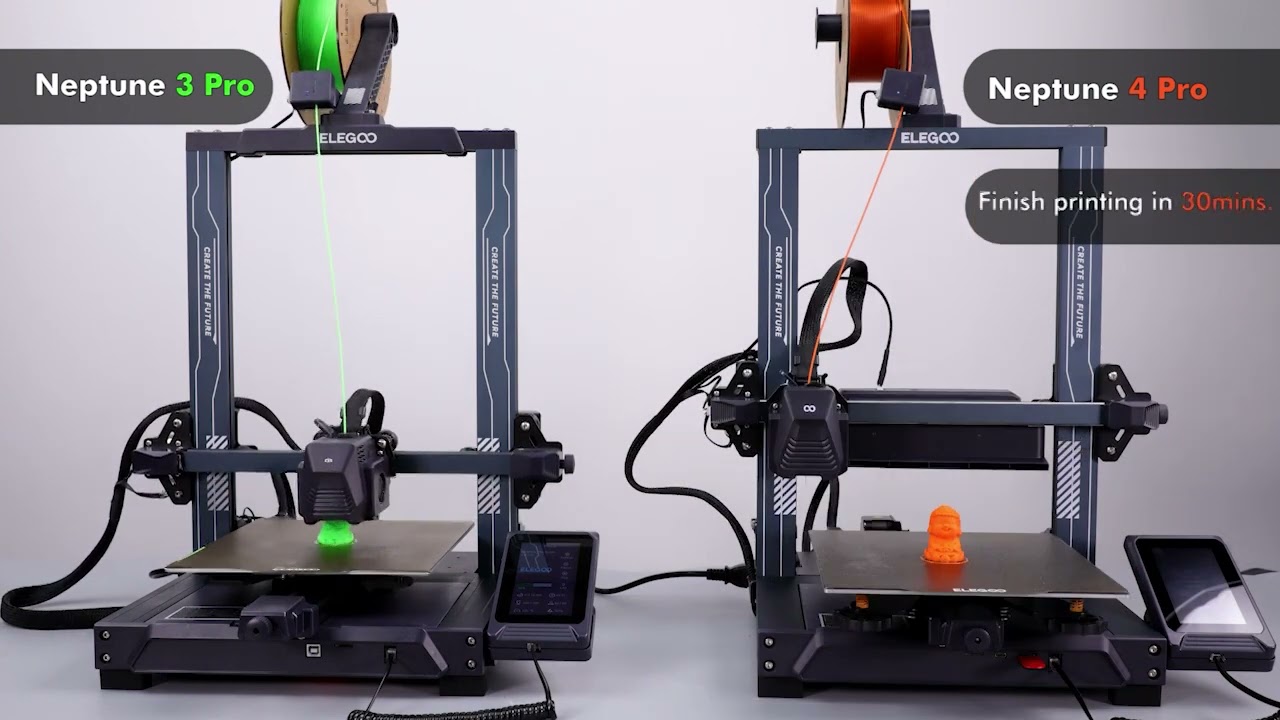
Overview: The Elegoo Neptune series is known for its reliability and affordability. The Neptune 3 Pro and Neptune 4 Pro are great options for users who want high-quality prints without breaking the bank.
Key Features:
Pros:
Cons:
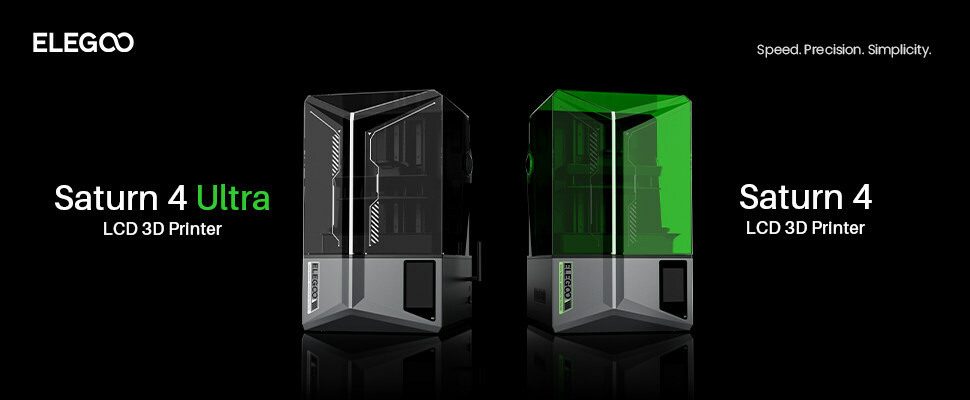
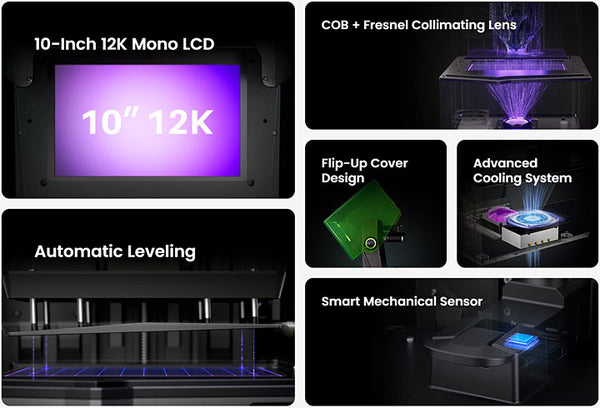
Overview: The Elegoo Saturn 4 Ultra is a resin printer that offers high-resolution prints, making it ideal for detailed models and professional prototypes. Its large build volume and reliable performance make it a top choice in the resin category.
Key Features:
Pros:
Cons:

Overview: The Bambu Lab X1CC is known for its cutting-edge technology and high-quality prints. This printer is designed for users who need precise and reliable performance, making it suitable for both professionals and enthusiasts.
Key Features:
Pros:
Cons:
Choosing the right 3D printer depends on your specific needs and budget. The Creality K1 Max and Elegoo Neptune 4 Pro offer excellent value for large projects, while the Elegoo Saturn 4 stands out for high-resolution resin printing. For those seeking advanced features and precision, the Bambu Lab X1CC is a top contender. No matter which model you choose, these 3D printers represent the best of what 2024 has to offer, ensuring you can bring your ideas to life with ease and accuracy.

In the past few years, at-home 3D printing has matured quite a bit from something exclusively for tinkerers with a weekend to devote to assembly and calibration. In 2022, there are many affordable options that anyone can get set up and printing in a matter of hours. This has also caused an overwhelming number of home 3D printers on the market today, and it can be difficult to choose the best one for your specific needs. To help you decide, we’ve narrowed it down to our top picks for entry-level and all-around printers Creality offers in 2022.
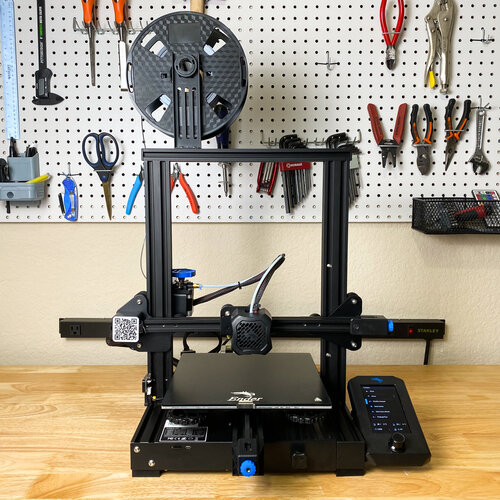
The Creality Ender 3 V2 stands out for its value and quality
An entry-level 3D printer is typically suited for hobbyists and beginners. People who are getting started with 3D printing might not have the expertise or patience for more complicated jobs. Unlike ten years ago, you are able to choose one from among dozens that have similar specs with wildly varying price points.
The Creality Ender 3 V2, the second version of the Creality Ender 3, is the best entry-level printer on the market as of 2020. It stands out for its value and quality.
This model rings in at less than Rs.50000. This makes it one of the most affordable models in its class without too many concessions in terms of quality.
It is a compact 3D printer, meaning it won’t take up the entirety of your workspace with its bulk. With a print bed of 220 x 220 x 250 mm, it fits on any desktop, workbench, or table with room to spare.
The Creality Ender 3 V2 added an updated silent motherboard, allowing the machine to run lower than 50 decibels(dB) while printing. To quantify, normal speech hovers around 60 dB, while the hum of a refrigerator is about 40 dB.
The print bed is composed of a material called carborundum, or silicon carbide, a hard ceramic material with extremely high durability and resistance to heat.
The Creality Ender 3 V2 is ideal for makers who are interested in a lower cost 3D printer that still has many modern features included with more premium machines. Its low price point, and convenience features make it a great first 3D printer or as a supplement to an existing 3D printer collection.
Why Creality?
Before we dive into the features that differentiate 3D printers, it’s worth asking why we decided to focus on Creality. The main reason is that Creality printers are known for their ease of use and overall quality.
The process of going from an unopened Creality printer to a setup that’s ready to print is typically very short compared to other 3D printer brands. Most users report spending just an hour setting up a new printer and calibrating it. Better yet, Creality printers are built so that you don’t have to get the adjustments absolutely perfect to produce good prints. That means that you can focus on bringing your designs to life as quickly as possible rather than wasting time on endless tweaks.
Another thing to like about Creality is that the company’s printers are reliable. Creality 3D printers are trusted by professional print shops that run their machines 24/7. They rarely need to be taken offline for repairs, which means that you don’t end up spending more money on your printer.
It’s nice that Creality is such a major player in the 3D printing world. An ever-increasing number of designs can be printed using Creality machines. If you want to add more capabilities to your printer, Creality makes a wide variety of accessories and there are plenty of third-party components that are compatible with the company’s equipment.
Features to consider before you buy a 3D printer
If you’re new to the world of 3D printers, it can be hard to know what all the specs mean. To help you navigate the technical jargon, we’ll identify the most important features of Creality 3D printers you need to know about and help you decide which one is right for you.
What do you want to print? Printer style
Perhaps the best place to start with choosing a Creality 3D printer is to figure out what style of printer you need. There are several different types that vary in capabilities and cost.
The most basic 3D printer style is a Fused Deposition Modeling (FDM) printer. Several of the Creality printers we reviewed, including the CR-10S and Ender 5 Pro, are FDM printers. These models are often favored by beginners because they are relatively affordable.
However, FDM printers do have some drawbacks. These printers operate by heating filament and extruding it into the desired shape. The problem is that when you create layers, the filament forms blocky lines as it is stacked on top of itself. So, you may need to spend a fair amount of time smoothing the exterior of your product with an FDM printer.

3D printers promise endless applications. However, sometimes reality gets in the way of that promise. One example of where that can happen is when trying to print something that needs to hold water, only to watch it leak like a sieve. Read on to find out to avoid such a tragic waste of liquid.
Yes, it can be done but it’s not always easy. To get the best results, you need to pay special attention to both the material and the settings you use. And even then, some post-processing may also be needed to get a part that is truly and reliably waterproof.
It is also worth talking about what we mean when we say waterproof. When talking about clothing or electronics, the word waterproof is usually used to indicate that an object is capable of keeping water out. For anything that needs to keep water in such as a vase, a more appropriate description would be watertight. Some industries like electronics also use the term water-resistant to describe something that can water out, up to a limit. Such as a phone which is only waterproof up to a certain depth.
In this article, we will use waterproof as an umbrella term to include all the above. The steps you take to make a print waterproof will also help it to be watertight and water-resistant. Although, most parts will not meet the same criteria that your waterproof phone is held to so it’s probably best not to go deep-water diving while relying on a printed part to protect anything sensitive.
To get waterproof parts, there are three areas that are important. The material used, your slicer settings, and post-processing.
It is possible to print waterproof parts with a variety of different 3D printing technologies. Some industrial printers with six-figure price tags are even capable of making extremely reliable waterproof parts with robust materials like metal. However, most people don’t have access to those printers so for this article, we will be focusing on the most common and accessible 3D printing technology, FFF printing.

Most FFF filaments are thermoplastics. Plastics are generally good at being waterproof which is why most water bottles are made of plastic. Plastics are also not normally degraded or damaged by water which is also why so many of those plastic bottles end up in the ocean and are likely to stay for a long time to come. However, there are a lot of different types of thermoplastics and all of them have different properties which are worth knowing before you try to print your waterproof parts.
A note on swelling: Many 3D printing materials are hygroscopic, meaning they absorb water. Some are worse than others (PETG, Nylon, PLA) and some are better (ABS, PP) but most absorb water to some extent. The result is, if you leave a part in contact with water for a long time it may start to swell. The amount of swelling is usually small, but it can deform your part and even cause it to split or break in a way that stops it from being waterproof or watertight. The swelling will not continue indefinitely or cause the part to degrade completely like it would with untreated wood. Instead, the part will likely swell up to a certain point (depending on the material) and then stop. If you have ever printed a part that was initially waterproof but started leaking over time, this was probably why. It should be possible to dry your part to remove the swelling but allowing a part to swell and then drying it repeatedly may cause increasingly more damage.
PLA
PLA is one of the cheapest and most common FFF printing materials. PLA can be used to create waterproof parts, but it does have some disadvantages. As mentioned above PLA can be prone to absorbing water and swelling.
PLA is also biodegradable. Meaning that (under the right circumstances) it can be composted. This is not an issue if it’s only exposed to perfectly clean water, but if you were to leave a PLA printed part submerged for an extended period in a body of water that contains microorganisms, like a pond, there is a chance that your part could start to degrade. Albeit slowly.
Lastly, PLA has low heat resistance. Meaning that if you wanted to use a printed part to hold hot water, it would likely deform. This can be solved by heat treating your part after printing. Heat treating is explained more later in this article.
PETG
PETG is another common and affordable FFF material. PETG is particularly hygroscopic meaning it’s prone to swelling. On the flipside, PETG has a high heat resistance so printed parts can be kept outside in direct sunlight without issue, and they can stand up to hot (although not boiling) water.
PP
PP is one of the better options for printing waterproof parts. It is less prone to swelling than PLA or PETG and it is chemical resistant. PP can also be used to print flexible parts that hold their shape and do not break after repeated bending.
ABS
ABS is a decent option for printing waterproof parts. It has a high heat resistance and is not as hygroscopic as many other materials. The best reason to use ABS, though, is that you can use Acetone to vapor-smooth parts printed in ABS. Vapor-smoothing will be talked about more in the post-processing section.
PVB
PolySmooth is a PVB-based material made by PolyMaker that is easy to print and has mechanical properties similar to PETG. The big advantage of PolySmooth for printing waterproof parts is that it can be vapor smoothed using isopropyl alcohol. The process is similar to how ABS is smoothed using acetone but isopropyl alcohol is much safer and easier to handle than acetone.
Just as important as the material you choose, is the settings you use. FFF printing works by stacking layers of material on top of each other, one at a time. The problem with that is that each layer has a chance of leaving a small gap between itself and the layer below. The following settings are mostly aimed at avoiding those gaps or mitigating their effect:
Wall line count
Wall line count is the setting that determined how many layers thick the outer wall of your print is. Generally, more wall lines will increase the chance of your part being waterproof. The reason is that they reduced the chance of water having a direct path through all the walls present. If under extrusion or some other issue has caused a small gap in one wall, the next wall acts as a backup to plug that gap.
A wall line count of 3 is normally a good place to start. It’s worth noting that increasing the wall line count for thin parts will have no effect. There is also one situation where a single wall is the best option, and that’s when using vase mode.
Spiralize outer contour (vase mode)
Spiralize outer contour (also known as vase mode) is a setting that enables smooth printing of objects with a single wall thickness. It turns the print into one continuous print path which means there are no retractions between layers and therefore no Z seam.
That is the biggest benefit of vase mode. The Z seam is one of the most common areas for gaps in your printed part to occur. Removing that seam makes parts with even a single wall capable of being waterproof. However, this setting is not suitable for most parts as it requires a very specific geometry. Vases, cups, and bowls are the kinds of prints that can be printed using vase mode.
Temperature
Gaps can appear when one layer is not properly bonded to the layer below. A higher printing temp is one way to increase layer adhesion. It’s generally best to print at as high a temp as your material will allow. Beware that when you print at too high a temp, the material can boil as it comes out of the nozzle, leading to more issues and potential gaps.
Flow rate
Under-extrusion is a major cause of gaps in your part. Even well-tuned print profiles can suffer from under-extrusion at times as they normally prioritize high dimensional accuracy, structural strength, or visual fidelit over other considerations. A slight increase to flow rate should be enough to see an improvement. Start with 105% and increase until you see diminishing returns.
Ideally, you should be able to pull a printed part off the build plate and have it be completely waterproof. However, sometimes a bit of post-processing is needed to shore up an almost waterproof part. Here are some of the main methods you can use:
Apply a waterproof coating
This is the easiest and most straightforward way to waterproof an otherwise leaky part. Applying a waterproofing spray, a clear coat, or even just water-resistant paint can help plug up any tiny gaps in your part. Multiple coats may be needed depending on the part and the coating used.
Vapor smoothing
Vapor smoothing using acetone for ABS or isopropanol for PVB is a great way to make a part more waterproof. Vapor smoothing is the process of using a chemical to melt the outer surface of a printed part just enough that it smooths out the part and removes the layer lines that are synonymous with FFF printed parts. Vapor smoothing is normally done to make a part look better but since it fuses the layers of a printed part together, it’s also a great way to fill gaps and make a part more waterproof.
Temperature treatment
Temperature treatment can be done in two ways and for two very different goals. The first is to apply heat to the outside of a print (usually with a heat gun) so that the outer surface melts just enough to fuse the layers together in order to remove the layer lines. This works in the same way as vapor smoothing and it helps remove gaps in the surface of a part and therefore makes it more waterproof.
The second is to heat soak a part over an extended period in an oven or other heated chamber. This process is called annealing. Annealing a part allows the layers of the entire part (even the interior) to bond together more strongly. This increases the strength of the part and makes it more temperature resistant in the future. This can result in PLA parts that have equal or higher temperature resistance to that of ABS or PETG parts.
Once you have perfected printing waterproof parts, there is a whole world of possible applications. One obvious area is food and drinks related prints like bowls, cups, or water bottles. While all these prints are possible, we would advise against it as FFF prints are often not food safe and the process for assuring they are is beyond the scope of this article.
However, there are plenty of other applications for waterproof parts. Some examples are:
Scientific research
3D printed parts can be perfect for helping in scientific research related to fluid dynamics and microfluidics. An example of this in practice are the researchers at Cardiff University using 3D printed parts to study microfluidics in a way that is cheaper and more flexible than traditional alternatives.
Gardening
Plant pots, composting containers, and hydroponics are just a few areas that are ripe for 3D printing to help with gardening. Beware that if you are using a printed part outside then you should make sure the material you use is suitable to the climate and environmental conditions. More robust materials like PETG and ABS might be a better choice than PLA, for example.
Water features
3D printed water features can be perfect for your pond or fish tank. And with the complete creative freedom that 3D printing provides, there’s no reason you can’t create an epic rube Goldberg-style water feature that fills your whole house with the soothing sound of gently flowing water.